Jake's Handy Dialogue Tool
Project Details
Project Type: Software / Dev Tool
Engine / Languages Used: Godot, GDScript, JSON
Role: Programmer, UI Designer
Description
Jake's Handy Dialogue Tool is a game development tool aimed at writers to help them script out dialogue scenes with reactive choices without touching a single line of code. The project also contains a scene reader that allows the user to play through scenes they’ve created to give them an idea of how they'll look when used.
Background
I would say that my first and foremost passion is writing, with video games coming in as a close second. Where those two interests intersect is an area that can elicit borderline obsession from me. If you were to ask me about any of my top ten favourite games, you would find that most of them are heavily story based games. I have a deep love for RPGs, especially ones with reactive dialogue systems.
This is not my first attempt at making something of this sort. As such it carries the experience of all past attempts, as well as the willingness to find workarounds to previous limitations I’ve encountered. While attending the speaker night of the WGC's PegJam 2025, one of the speakers spoke about the Godot engine and how flexible it is for creating game development tools.
During that talk, the inspiration for this project struck me like lightning.
Goals
I wanted to make a game development tool aimed at writers that would allow them to easily script out dialogue scenes with branching choices, and then save all of that scene information (including all the info needed for choices) into a fairly readable .json file.
I also wanted the tool to be able to open and modify previously created scenes, allowing for work to be done on a scene over multiple sessions without having to touch an ounce of code.
To accompany this tool, I also wanted to make a very basic scene reader that could allow the user to play through scenes they’d created, showcasing how the scene data could be used in practice.
Core Functionality
The tool functions by storing each "story node" (sequences, choices) into arrays sorted by type as they're created. Whenever they are updated, they pass their changes upstream to the scene constructor. When you save your scenes, the editor runs through all scenes and tells their scene constructors to make sure their contents are up to date.
Once they are, it gathers a bunch of data that is already JSON compatible and saves it to a JSON file on the user's device at "C:/Users/user/AppData/Roaming/Godot/app_userdata/DialogueSystem".
Fun fact: the app_userdata folder is where most Godot Games store their save data due to engine limitations. Have fun with that!
When you boot up the project, it searches that directory for the JSON file. If it doesn't already exist, it creates one that includes two example scenes I built using this tool. From there, you can play through any scene using the scene reader, or create/modify any scenes using the scene constructor.
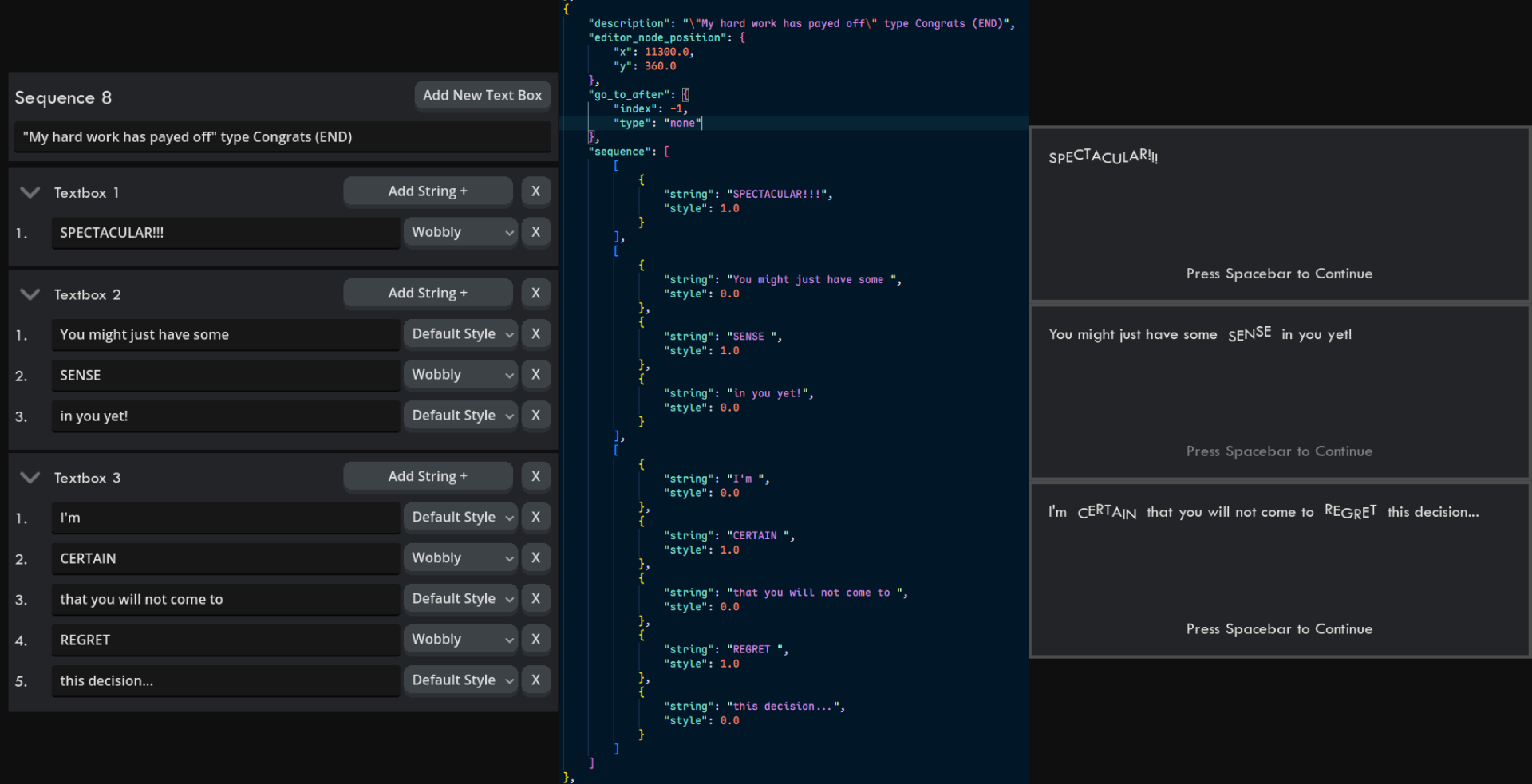 Here's an example of how a sequence gets stored and later decoded by the project!
Each textbox is actually an array of objects, each of which has a string and a style. When decoded, these lines are appended onto the end of each other seamlessly using a wrap box.
This allows you to switch text styling mid-textbox, which is something I personally would look for in a tool like this.
Reflections
Initial Thoughts On Completion:
I feel confident in saying that over the course of this project I have become so acquainted with Godot’s control (UI) nodes that building scenes with them is second nature to me now. This project pushed my programming and problem solving skills to their limits. I learned a lot about software design, particularly how to adapt to changes when initial design ideas prove not to work in practice. I also learned a lot about how to structure data.
Current Thoughts:
Looking back on this project, it occurs to me that this is where I really learned how to think about programming architecturally, rather than just simple line to line code. I think back on where I was before starting this project, and I just remember being super anxious to put something impressive in my portfolio so I would get accepted into college. But in the month-long process of actually making it, all of those worries fell away and I just fell in love with it. By the time I was done, I didn't even care if I got into school anymore, because no matter what the portfolio review committee thought, I was proud of myself and my work.What this project really taught me was that even if something is currently outside my grasp in terms of skill, I can build a ladder and get where I need to be anyway. It feels weird to say, but I'm a better person because I made this software tool. Maybe I'll revisit it some day, maybe I'll keep it as is forever. Either way, there will always be place in my heart for this thing. For my money, this is the best thing I've ever made.
Here's a play-through of a scene I wrote using this tool, played in the scene reader.
A Fun Fact About This Project
While in the process of creating this tool, I made the decision to treat it like a trial run of what it would be like to become a programmer as my profession. Despite the fact that I was already working a job 25-30 hours a week, I decided to work on this project every day as much as I could to prove to myself that I was dedicated enough to do this professionally. Given that this piece is undoubtedly what got me into school for game dev programming, I'd say the effort paid off.