 Here's my most recent attempt ;)
Project Details
Project Type: Browser Game / School Project
Engine / Languages Used: Custom , javascript + p5
Role: Everything
Description
This is a recreation of the classic game "Asteroids" made from scratch in javascript using the p5 library.
Intended to run in your browser, play a game where you must navigate and clear out asteroids and hostile alien life forms using your blaster, which has A LOT of recoil. Survive as long as you can, and keep track of your attempts using the leaderboard!
Background
I made this game for an assignment I was given in the "Applied Math for Games" class in my second term at RRC's "Game Development: Programming" program. The assignment was structured in a manner where every feature we implemented from a large list was worth a set number of points based on their difficulty. If one were to implement every feature and complete every bonus task, they would be given well over 100% on the assignment. From there, we were given the keys to plan out our project on our own, structure the architecture as we pleased, and choose which features we wanted to implement, and in what order.
Goals
Game Over!
Plain and simple, my main goal here was to overachieve. I wanted to implement as many gameplay features as I could. My minimum target grade for this assignment was 100%, and I would accept no less. I tend to do my best work when pushing myself like that.
This meant getting all of the core features into the game, as well as abiding by certain restrictions and guidelines during the process for extra marks wherever I could find them. It also meant finding a way to include a leaderboard that saved a player's previous attempts.
Being one of the few programmers in the class with a bit of prior web experience, I also wanted to use this as an excuse to dust off those old skills and make the project's html elements look nice and pretty wherever possible.
Core Functionality
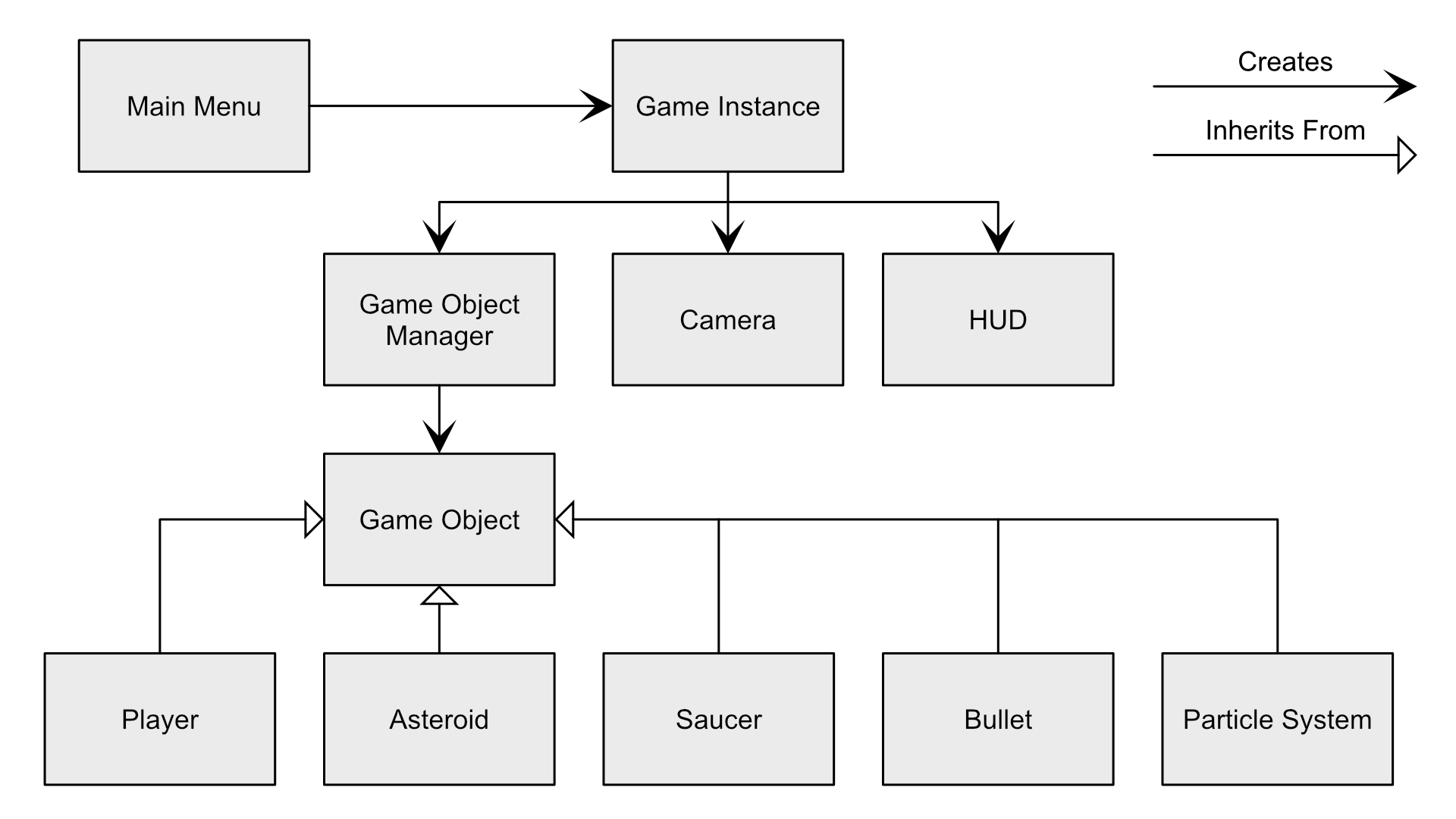 javascript handles deletion of class instances automatically when references to the instance are removed or lost, so all instances needed for gameplay are stored one jump up the "Creates" hierarchy (i.e. Game Objects are created, stored and cleared by the Game Object Manager, which is created and stored by the Game Instance).
By positioning all "game essential" class instances downstream of the Game Instance, we can start a new game by replacing the single reference to the old game instance with a new one. This clears all references to every instance from the old game, trashing them.
Reflections
My Final Grade on this assignment was 107.14%. Needless to say, I really like how this project turned out!
I'd say my favourite aspect of the game as it stands is the shot recoil. I'm well aware it's way too much, but that's part of the fun of it! I set it high on purpose while implementing it for testing purposes, and I found that the game was more fun when it was high than when it was low. It provides an alternate way to move around, and allows you to play much more recklessly. Chasing down asteroids and saucers and bailing out of a collision using the recoil is a ton of fun. It's a testament to the idea that sometimes the best way to balance the feel of a feature is start high and dial it in, rather than starting low cranking it up.
The Look:
For the visuals, as I was going through the project I found myself drawn to this very minimalist "old military simulation" style that I really enjoyed. Relearning all the interactions between html, css and javascript after some time away took a little longer than I'd hoped, but I was able to work it out. Overall, I think it looks pretty dang good!Programming Challenges:
Look at him go! The hardest feature to implement (and by extension the one with the highest point value) was giving the smaller enemy saucers physics based movement and AI that allowed them to navigate the level without crashing. I was a little worried that I may have to neglect this feature in favour of finishing other features. It turns out that my classmate Sam and I saved ourselves a ton of work on the detection part of this setup by way of some rather efficient collision checking. We spent a long time collaborating on working out efficient ways to run collision checks every frame, and as a result, making the saucers move intelligently was much easier that we were led to believe.If anything, the hardest part about how I chose to do it was adding extra features! After my son was basically flawless at avoiding obstacles, I decided that he should also be way more aggressive towards the player to increase the difficulty. Now he follows the player around (including through screen wrap, which was a nightmare on it's own) unless the player is within a short range outside of the danger zone.
This creates the fun challenge of forcing the player to deal with him. Is this potentially too difficult for an inexperienced player? Yes, but this is an arcade game, so I choose to think of it as a welcome difficulty spike that proves the player's skill. Besides, this is only how the smaller enemies work, and they're incredibly rare unless you're unlucky.
A Fun Fact About This Project
I spent an undue amount of time on this project trying to fix a periodic clicking noise that happens as a result of the ship's thruster sound effect looping. It led me down an extended rabbit-hole about web standards for playing audio, which resulted in me learning a ton of cool stuff that was ultimately useless for this problem. Turns out it was just an issue with the frequency range of the sound effect itself and how that interacts with speakers. The slight workaround I found was to have the sound fade in when the player's move input starts, and fade out when it ends. This avoids the initial click, but not any of the subsequent ones. I reduced the volume to mitigate the click as much as possible, but it's still there unfortunately.
Additional Credits
Kyle Geske - Instructor + Feature Reviewer
Purple Planet - Source for background music.
Samuel Daya - Brainstorming buddy.